 Yolk
YolkThe alarm you can't argue with at 6 a.m.
Yolk rings through silent and Focus, then asks you to finish one small thing before it goes quiet. Miss it, and it checks again a few minutes later.
Get Yolk on the App StoreFree. The free plan shows ads; everything that wakes you up is included.
Pip hatches on the mornings you actually get up.
Why this one goes off
Yolk is an alarm clock that makes you finish a small mission before it goes quiet. Your alarms, habits and progress live on your iPhone. There is no account and no server of ours. On the free plan the app shows ads, which is the one place another company is involved: that is spelled out below rather than buried.
It rings on silent
Yolk schedules through AlarmKit, the same system Apple's own Clock app uses. Silent switch on, Focus mode active: it still sounds. Most alarm apps are notifications wearing an alarm's clothes, and go quiet exactly when it matters.
The wake-up check is free
A few minutes after you switch the alarm off, Yolk checks that you are still up. Other alarm apps charge for that one. It catches the morning you finished the mission on autopilot and went straight back to bed.
Nineteen sounds, or your own
Six packs, from a gentle marimba sunrise to an air-raid horn, plus a memes pack. If none of them work on you, import a sound from your own files and Yolk converts it into something an alarm can play.
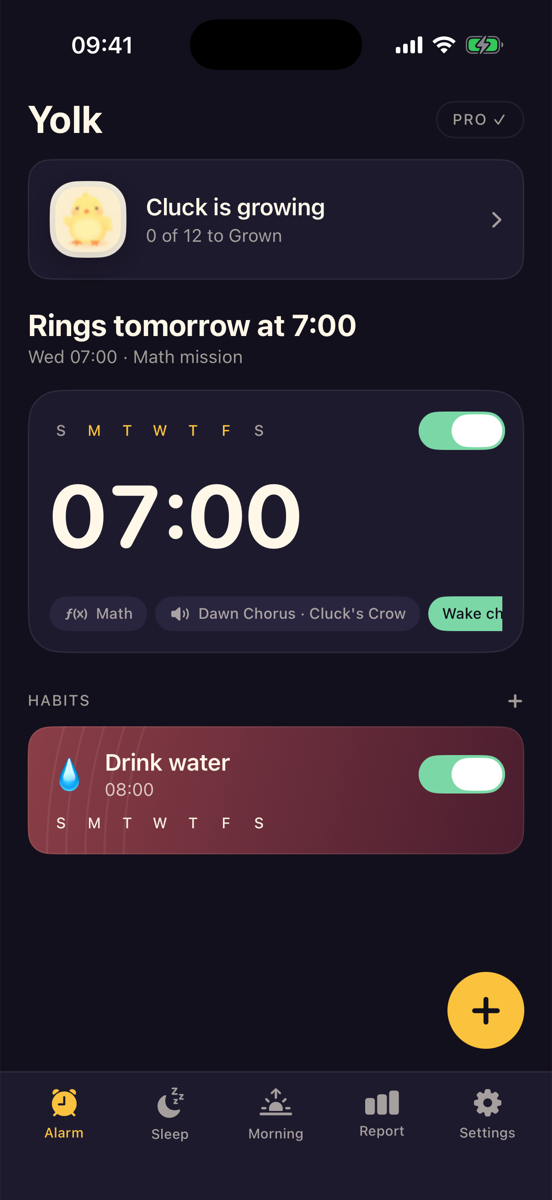
One screen, the whole morning
Your alarm, the mission attached to it, and the habits that follow: all on one screen.
- Rings alarms through iOS AlarmKit, so they sound even when the iPhone is on silent or in a Focus mode.
- Asks you to finish a mission, sums, typing, colour tiles, shaking, squats, steps, or photographing a spot you chose, before the alarm can be switched off.
- Can arm a wake-up check a few minutes later, to catch the mornings you got up, turned it off and went back to bed.
- Tracks habit alarms and a wake-up streak, and grows an on-screen creature as you keep it.
- Plays a sound you pick from nineteen bundled ones, or one you import yourself.
Seven ways to prove you're awake
Pick the one that works on you. Every mission is free, and the alarm will not go quiet until it is finished.
What it costs
The alarm itself is free, and so is every mission, all nineteen bundled sounds, importing your own sound, habit alarms, the streak, the creature, and the wake-up check that catches you going back to bed. The free plan shows ads. Yolk PRO removes the ads and unlocks the extras built on top of the basics.
Subscriptions are billed by Apple and renew until cancelled. Manage or cancel in Settings on your iPhone.
Questions
Will the alarm ring if my iPhone is on silent?
Yes. Yolk uses AlarmKit, the same system Apple's own Clock app uses, so the alarm sounds on silent and through a Focus mode. That is why the app asks for alarm permission on first launch, without it, iOS will not let the alarm break through.
Why does the app want the camera?
Only for the Item Snap mission, and only if you choose it. You register a spot, the sink, the kettle, by photographing it once, and in the morning you photograph it again to switch the alarm off. The comparison happens on your iPhone. No photo is uploaded and nothing is sent anywhere.
Why does it want Motion & Fitness?
Only for the step, squat and shake missions, so it can count them. Yolk asks in daylight, when you are setting the alarm, rather than at six in the morning over a ringing alarm. If you never pick one of those missions, it never needs the permission.
Do you see my alarms?
No. There is no account and no server of ours. Your alarms, habits, streak and points sit in the app's own storage on your iPhone, and deleting the app deletes them.
What do the ads see?
Ads on the free plan are served by Google AdMob, which receives technical information about your device to serve and measure them. iOS asks you first whether Yolk may track you; decline and the ads are not personalised, but they still appear. Subscribing removes them altogether.
Can I use my own alarm sound?
Yes. Import a sound from your files and Yolk converts it into the format an alarm needs and keeps it on the device. Imported sounds are trimmed to thirty seconds, which is the limit iOS places on an alarm sound.
How do I cancel a subscription?
Subscriptions are managed by Apple, not by us: open Settings on your iPhone, tap your name, then Subscriptions. Cancelling there stops the renewal. If you cancel during the 3-day trial on the annual plan you are not charged.
Also by the same developer
Small, single-purpose iPhone apps. Here is what else is on the App Store.
 Acrely: GPS Field Area MeasureWalk a boundary and get the area. Built for land, fields and lots, with no tape and no second person.
 Trackity: Habit TrackerTrack daily habits with widgets, reminders and weekly goals. No account, no sign-in, everything stays on your phone.
 TrainPaw: Dog & Puppy TrainingStep-by-step training plans for barking, biting, potty accidents and leash pulling: built around the dog you actually have.
 Tapely: Tape Measure & RulerMeasure distance, height, area and angle through the camera, plus a calibrated ruler, level and angle finder that need no camera at all.