 Tapely
The tape measure you already have on you.
Aim, tap, aim, tap: a real distance, in feet and inches or metres. Plus a ruler, a level and an angle finder for when the camera can't help.
Get Tapely on the App StoreFree to measure. The free version shows an occasional ad; one payment removes them.
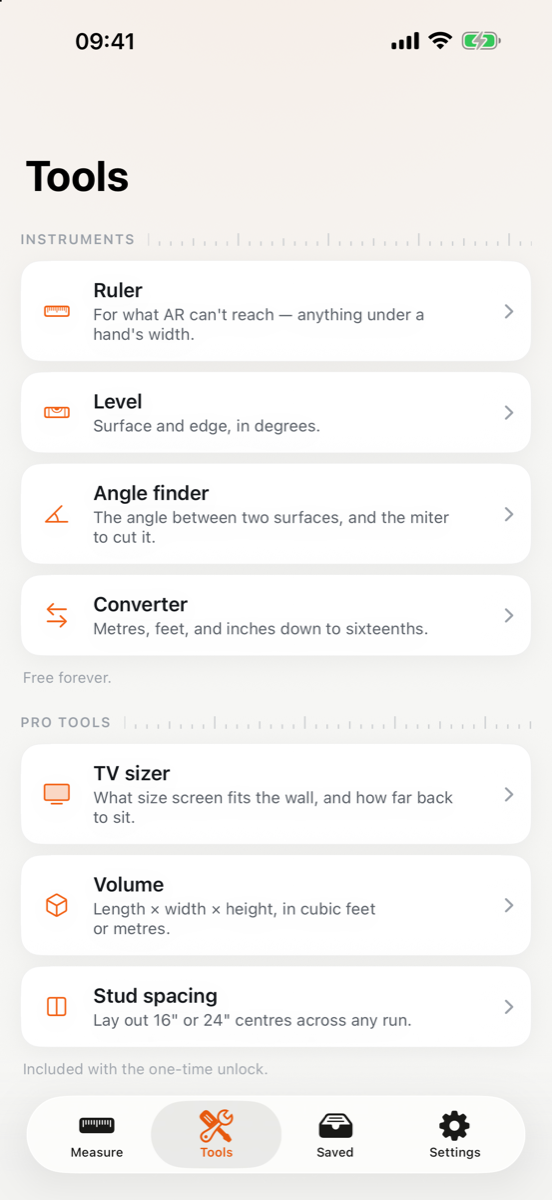
Four instruments that need no camera at all.
Why this one is worth keeping
Tapely measures through the camera and keeps what you measured on your iPhone. There is no account and no server of ours, and nothing you measure ever leaves the device. The free version shows ads, which is the one place another company is involved, and that is spelled out below.
Measuring is free
Distance, height, area and angle, chained runs, every unit, and as many saved measurements as you like. Nothing that produces a number is behind the paywall.
Honest about accuracy
AR measuring lands within about 2–3%. Tapely shows when a reading can be trusted, and when it can't, it says which problem you have.
It corrects itself
Measure a bank card once, it is made to an exact standard, and Tapely works out how far off your iPhone runs and corrects every reading after.
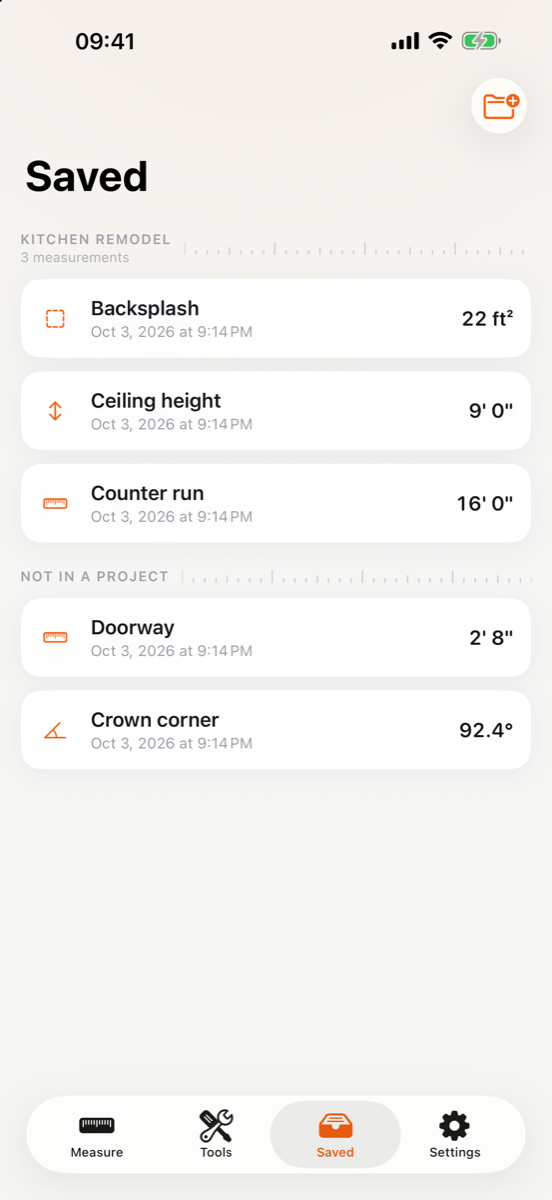
Keep what you measure
Name it, add a note, reopen it whenever. A whole job saves together under its name.
- Measures distance, height, area and angle using ARKit, drawing each measurement into the camera view.
- Provides four instruments that need no camera at all: a calibrated on-screen ruler, a bubble level, an angle finder and a unit converter.
- Saves what you measure in the app's own storage on your device, with no limit on how many measurements you keep.
- Corrects its own readings once you measure something of known size, such as a bank card, so the scale error of your particular iPhone is cancelled out.
- Shares a measurement as text, and adds three extra tools, a TV sizer, a volume calculator and stud spacing, to anyone who buys the one-time unlock, or for one use at a time after watching an ad.
Eight things it measures
Four through the camera, four with no camera at all. All of them free.
What it costs
Measuring, distance, height, area and angle, is free, and so are chaining, snapping, every unit including fractional inches, the ruler, the level, the angle finder, the converter, calibration, and saving as many measurements as you like. The free version shows an occasional ad after a save, never while you are measuring. The one-time purchase removes the ads and adds sharing, folders you create yourself, and three convenience tools. It does not unlock measuring, because measuring was never locked.
A one-time purchase, billed by Apple. It never renews.
Questions
Why does the app want the camera?
The camera is the measuring instrument. ARKit tracks the space in 3D through it, which is what lets you aim at two points and get a real distance. Nothing is recorded and nothing is uploaded, no photo or video ever leaves your iPhone. The ruler, the level, the angle finder and the converter work with the camera permission refused.
How accurate is it?
Within about 2–3% in good conditions. Every AR measuring app on any phone has the same limit, because the scale of the world is estimated rather than measured. Tapely differs in two ways: it tells you when tracking is poor rather than showing a confident number anyway, and it lets you calibrate against a bank card so the consistent part of the error is removed.
What does calibrating actually do?
Your iPhone's estimate of world scale is wrong by a small, consistent amount. Measure something whose size is fixed by standard, a bank card is 85.60 mm across, by international specification, and Tapely works out how far off your device runs and applies that correction to every reading afterwards. A ratio too far from 1 is refused rather than applied, because a large 'correction' means you measured the wrong thing.
Is there a subscription?
No. There is one purchase, made once, and it never renews. It also removes the ads. Everything needed to measure something is free without it.
Why do I see ads?
The free version shows a full-screen ad after some saves, never while you are measuring, and offers one use of sharing or a Pro tool in exchange for watching an ad. Tapely Pro, a one-time purchase, removes every ad. In the EEA and the UK you can change your ad consent in Settings → Ad privacy.
How do I switch between metres and feet?
Settings → Units. There are three: metric, decimal feet, and feet with fractional inches down to sixteenths. Fractional inches are free and always will be.
I reinstalled the app and my measurements are gone.
Measurements live in the app's own storage on your device and nowhere else, which is what lets us promise that nothing you measure reaches us. Deleting the app deletes them, and we cannot recover them. Your purchase is a different matter: tap Restore purchase in Settings and it comes back.
How do I get a refund?
Purchases are handled entirely by Apple, so refunds go through them: reportaproblem.apple.com, signed in with the Apple Account that made the purchase. We cannot issue one on your behalf.
Also by the same developer
Small, single-purpose iPhone apps. Here is what else is on the App Store.
 Acrely: GPS Field Area MeasureWalk a boundary and get the area. Built for land, fields and lots, with no tape and no second person.
 Trackity: Habit TrackerTrack daily habits with widgets, reminders and weekly goals. No account, no sign-in, everything stays on your phone.
 Yolk: Alarm Clock & HabitsAn alarm that rings through silent and Focus, then makes you finish one small mission before it goes quiet.
 TrainPaw: Dog & Puppy TrainingStep-by-step training plans for barking, biting, potty accidents and leash pulling: built around the dog you actually have.